Thursday, April 30, 2009


Monday, April 27, 2009
Automatically connect to console in Remote Desktop (OSX)
macosxhints.com - Automatically connect to console in Remote Desktop

When using Remote Desktop Client for Mac to connect to a Windows Server 2003 machine, you can hold down the Command key while pressing Connect to connect to the server's console session.
If you want to save your connection settings to a file, however, there is no option in the GUI to automatically use the console session. To do this, you will need to open up the saved connection file in your favorite text editor, and add the following line:
connect to console:i:1
Wednesday, April 22, 2009
Running IE on your Mac
Found this interesting page regarding running various versions of IE on your Mac. - in a virtual of course...
Its also interesting in regards to using Microsoft Virtual PC for users that do web development to be able to test different versions of IE on a windows platform.
Running IE6, IE7 and IE8 on your Mac — The Mozmonkey Blog

Its also interesting in regards to using Microsoft Virtual PC for users that do web development to be able to test different versions of IE on a windows platform.
Running IE6, IE7 and IE8 on your Mac — The Mozmonkey Blog
Wednesday, April 15, 2009
Installing VMware Tools on SLES10 Linux on VMWare Fusion
In vmware fusion i installed SLES10 sp2 however when attempting to install the vmware tools there was no RPM install.
On vmware.com there is a link to download an ISO that contains the Linux VMware tools - you can download it from here or direct link to iso
Linux Version | 2008/09/12 | 183 MB
Download .iso file
md5sum: 10ae80986e1532a188f8b93ad878945e
once downloaded, load up fusion and run SLES.
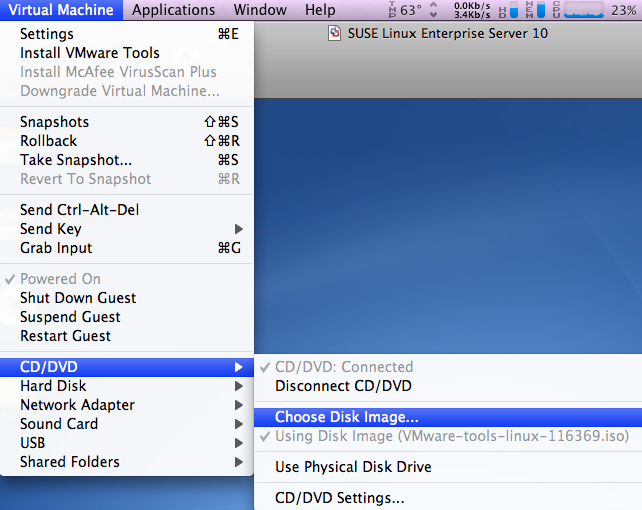
Click on Virtual Machine > CD/DVD > choose disk image
and select the iso file
also, make sure that CD/DVD is Connected
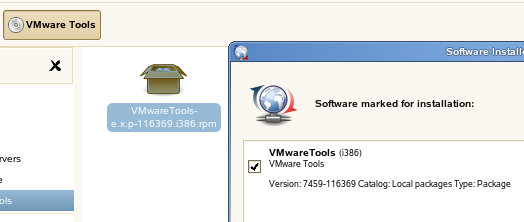
You should now have the following icon on your SLES desktop

double click on VMware Tools
and run the RPM installer
Configure VMware Tools:
Load up a terminal windows in SLES
Thats IT!
vmware tools should now be installed and working!
from vmware.com

On vmware.com there is a link to download an ISO that contains the Linux VMware tools - you can download it from here or direct link to iso
Linux Version | 2008/09/12 | 183 MB
Download .iso file
md5sum: 10ae80986e1532a188f8b93ad878945e
once downloaded, load up fusion and run SLES.
Click on Virtual Machine > CD/DVD > choose disk image
and select the iso file
also, make sure that CD/DVD is Connected
You should now have the following icon on your SLES desktop
double click on VMware Tools
and run the RPM installer
Configure VMware Tools:
Load up a terminal windows in SLES
vmware-config-tools.pl
Respond to the questions the installer displays on the screen. Press Enter to accept the default value.
Thats IT!
vmware tools should now be installed and working!
from vmware.com
Tuesday, March 31, 2009
Convert a CD/DVD to an ISO in Mac OSX Lepoard
1. Insert the CD/DVD
2. Open disk utility and select the CD/DVD
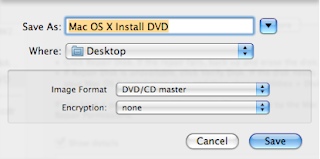
3. Select New Image and change Image Format to DVD/CD Master
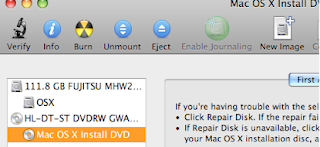
4. Wait for the image to be created – it will be a .cdr file
To convert from .cdr to .iso
5. Open terminal and issue the following command from the same path as the .cdr file
hdiutil makehybrid -iso -joliet -o FILENAME.iso FILENAME.cdr
2. Open disk utility and select the CD/DVD

3. Select New Image and change Image Format to DVD/CD Master

4. Wait for the image to be created – it will be a .cdr file
To convert from .cdr to .iso
5. Open terminal and issue the following command from the same path as the .cdr file
hdiutil makehybrid -iso -joliet -o FILENAME.iso FILENAME.cdr
Monday, March 23, 2009
How to Connect to and Shadow the Console Session with Windows Server 2003 Terminal Services
If you have installed SP-3 on XP or are running Vista, you'll need to use /admin.
more info @ Microsoft
%SystemRoot%\system32\mstsc.exe /F /admin/F = Fullscreen (optional)
more info @ Microsoft
Wednesday, March 18, 2009


Tuesday, February 17, 2009
Vista 64bit Novell Client - NMAS Error 0xFFFFF95F
The following error:
Novell Doc: NDK: Novell Modular Authentication Services - NMAS Error Codes: "0xFFFFF95FNMAS_E_INVALID_SPM_REQUESTThe requested password operation is invalid"
Novell Doc: NDK: Novell Modular Authentication Services - NMAS Error Codes: "0xFFFFF95FNMAS_E_INVALID_SPM_REQUESTThe requested password operation is invalid"
"windows is unable to find a system volume that meets its criteria for installation" - DELL COMMUNITY
Attempting to install Vista 64bit on a Dell PC
"windows is unable to find a system volume that meets its criteria for installation" - DELL COMMUNITY: "SOLUTION:
I had been using the F12 prompt to boot to the vista cdrom but the cdrom was set as the first boot device. Once i permanetly changed the boot order to boot to the hard drive first this problem disapeared. (and was then able to use the F12 boot menu to boot off the cd and install windows)"
"windows is unable to find a system volume that meets its criteria for installation" - DELL COMMUNITY: "SOLUTION:
I had been using the F12 prompt to boot to the vista cdrom but the cdrom was set as the first boot device. Once i permanetly changed the boot order to boot to the hard drive first this problem disapeared. (and was then able to use the F12 boot menu to boot off the cd and install windows)"
Monday, December 22, 2008
VMWare Player on Opensuse 11.1
after upgrading to openSUSE 11.1 i had the following error with VMware player.
even after reinstalling.
Solution:
run
vmware will reconfigure and will run.
even after reinstalling.
fezbox:/data/Appz # vmplayer
Logging to /tmp/vmware-root/setup-14605.log
modinfo: could not find module vmmon
modinfo: could not find module vmnet
modinfo: could not find module vmblock
modinfo: could not find module vmci
modinfo: could not find module vsock
modinfo: could not find module vmmon
modinfo: could not find module vmnet
modinfo: could not find module vmblock
modinfo: could not find module vmci
modinfo: could not find module vsock
/usr/bin/vmplayer: line 31: 14605 Segmentation fault "$BINDIR"/vmware-modconfig --appname="VMware Player" --icon="vmware-player"
Solution:
Login as root
mv /usr/lib/vmware/modules/binary /usr/lib/vmware/modules/binary_old
run
vmplayer
vmware will reconfigure and will run.
Wednesday, November 26, 2008
OSX iPrint Problem Resolved
The problem was the version of iPrint that was installed from the server was an old version.
I installed the latest mac osx iPrint client from Novell (iprintdmg436) and the printer installed from the iPrint webpage.
OSX iPrint Problems
I have been trying to install iPrint printer in Mac OSX however I have been running into problems.
I can install the printers fine on my OSX machine (an old powerbook G4).
However i was unable to install the printers on the newer intel osx machines.
I originally thought there was a driver issue causing the browser to crash.
However, i recently attempted to install the printer on another powerpc and the browser was also crashing.
Then it hit me,
my machine is updated with all the osx updates.... these other machines (well i know for sure the other powerpc mac) are not up-to-date.
So I am going to install the latest patches and try again....
I can install the printers fine on my OSX machine (an old powerbook G4).
However i was unable to install the printers on the newer intel osx machines.
I originally thought there was a driver issue causing the browser to crash.
However, i recently attempted to install the printer on another powerpc and the browser was also crashing.
Then it hit me,
my machine is updated with all the osx updates.... these other machines (well i know for sure the other powerpc mac) are not up-to-date.
So I am going to install the latest patches and try again....
Friday, November 21, 2008
OSX iPrint to Konica Minolta Printer in Grayscale
install iPrint client
download the konica minolta drives from the website.
I had to use the Linux drivers.
once the drivers are uploaded to the iprint server you can assign the driver to the printer.
Now install the printer on your mac through iPrint.
Now to setup grayscale printing you must manually change the settings on each osx manchine by using cups.
goto:
http://127.0.0.1:631/admin on the osx machine
Click on > Manage Printers > Set Printer Options
change the following settings:
Select Colour to Gray scale.
download the konica minolta drives from the website.
I had to use the Linux drivers.
once the drivers are uploaded to the iprint server you can assign the driver to the printer.
Now install the printer on your mac through iPrint.
Now to setup grayscale printing you must manually change the settings on each osx manchine by using cups.
goto:
http://127.0.0.1:631/admin on the osx machine
Click on > Manage Printers > Set Printer Options
change the following settings:
Select Colour to Gray scale.
click on apply settings
You will get some warning messages
# RGB Source(Text)
# RGB Source(Photo)
# RGB Source(Graphic)
set all of these to None
Now is also a good time to set the Papersize to the correct setting.
Apply settings
Formatting External SMT Raid Enclosure in OSX
I was unable to format an external enclosure using the disk utility in osx.
It would jsut error out.
However I found a command line to format the drive.
First do the following:
Open Terminal and run:
This tells you the location of the drives on your mac.
In my case i only have 1 internal drive and 1 external drive plugged in.
The external drive is disk1.
Then to format the drive run the following command in termainal:
where desiredvolumename is the name yo wish to assign the drive
It would jsut error out.
However I found a command line to format the drive.
First do the following:
Open Terminal and run:
diskutil list
This tells you the location of the drives on your mac.
In my case i only have 1 internal drive and 1 external drive plugged in.
The external drive is disk1.
Then to format the drive run the following command in termainal:
diskutil eraseDisk "Journaled HFS+" desiredvolumename disk1
where desiredvolumename is the name yo wish to assign the drive
Thursday, November 20, 2008
OTRS MySQL InnnoDB
I ran into some issues with MySQL Foreign Key errors apon updating to the latest OTRS.
As our DB was old, it was using MyISAM which was the default for MYSQL 3.
I have changed all the OTRS tables to InnoDB
As our DB was old, it was using MyISAM which was the default for MYSQL 3.
I have changed all the OTRS tables to InnoDB
Wednesday, November 19, 2008
OTRS cron to check mail
I have put the otrs cron into
/etc/cron.d
Some information on cron available at
http://www.linuxtopia.org/online_books/suse_linux_guides/SLES10/suse_enterprise_linux_server_installation_admin/sec_suse_pakete.html
/etc/cron.d
Some information on cron available at
http://www.linuxtopia.org/online_books/suse_linux_guides/SLES10/suse_enterprise_linux_server_installation_admin/sec_suse_pakete.html
Monday, November 17, 2008
Upgrading OTRS 2.2.8 to 2.3.3 on SLES 10
Download the rpm package from otrs.org
The instructions on upgrading can be found in opt/otrs
Stop all services
"rcotrs stop-force"
Backup everything - the otrs direcotry (opt/otrs and the mysql DB.
run the rpm
run the mysql upgrade scripts (I used the mysql query administrator to do this)
otrs/scripts/DBUpdate-to-2.3.mysql
i ran into errors when doing this and had to manually step through each line of the sql script.
Run the migration script (you need ot run as the OTRS user, not as root)
$OTRS_HOME/scripts/DBUpdate-to-2.3.pl
however i ran as root and when finsihed run
otrs/bin/SetPermissions.sh
run the 2nd mysql update script
$OTRS_HOME/scripts/DBUpdate-to-2.3.post.mysql.sql
Restart the OTRS services
rcotrs restart-force
The instructions on upgrading can be found in opt/otrs
Stop all services
"rcotrs stop-force"
Backup everything - the otrs direcotry (opt/otrs and the mysql DB.
run the rpm
run the mysql upgrade scripts (I used the mysql query administrator to do this)
otrs/scripts/DBUpdate-to-2.3.mysql
i ran into errors when doing this and had to manually step through each line of the sql script.
Run the migration script (you need ot run as the OTRS user, not as root)
$OTRS_HOME/scripts/DBUpdate-to-2.3.pl
however i ran as root and when finsihed run
otrs/bin/SetPermissions.sh
run the 2nd mysql update script
$OTRS_HOME/scripts/DBUpdate-to-2.3.post.mysql.sql
Restart the OTRS services
rcotrs restart-force
OTRS on SLES 10SP2 32bit
Migrating OTRS 2.28 to a new server
then upgrading to OTRS 2.3
To install OTRS in SLES 10sp2 you need to instal some extra perl-gd packages.
The packages can be installed form the SLES10SDK-x86 SP2 DVDs
I managed to find an online repository using google search.
Once you have the packages you must manually install all the "Perl-gd-*" packages
for some reason they wont install automatically (well they wouldnt for me when i attempted to install otrs from the rpm file)
Anyways, once all the perl-gd packages are installed you can then install otrs.
double click on the rpm and away you go.
You will be prompted to install some extra packages, this will be done automatically.
then upgrading to OTRS 2.3
To install OTRS in SLES 10sp2 you need to instal some extra perl-gd packages.
The packages can be installed form the SLES10SDK-x86 SP2 DVDs
I managed to find an online repository using google search.
Once you have the packages you must manually install all the "Perl-gd-*" packages
for some reason they wont install automatically (well they wouldnt for me when i attempted to install otrs from the rpm file)
Anyways, once all the perl-gd packages are installed you can then install otrs.
double click on the rpm and away you go.
You will be prompted to install some extra packages, this will be done automatically.
Friday, November 14, 2008
SLES 10 sp2 32bit on XenServer
Install the Guest Agent
once installed, mount the xs-tools iso to install the guest agent
mount /dev/xvdd /mnt
Execute the installation script as the root user
/mnt/Linux/install.sh
Reboot the VM
once installed, mount the xs-tools iso to install the guest agent
mount /dev/xvdd /mnt
Execute the installation script as the root user
/mnt/Linux/install.sh
Reboot the VM
Monday, February 11, 2008
Cron Job - cron tabs
the otrs cron file disappeared from
/var/spool/cron/tabs
so i had to add the file back in there.
I wonder if i have this setup wrong or was it just a once off thing?
anyways i will monitor it and if it happens again i will reconfigure the cron.
/var/spool/cron/tabs
so i had to add the file back in there.
I wonder if i have this setup wrong or was it just a once off thing?
anyways i will monitor it and if it happens again i will reconfigure the cron.
Subscribe to:
Posts (Atom)

 Posts
Posts


