Showing posts with label SLES 10. Show all posts

Friday, May 01, 2009

Dreamweaver SFTP to SLES 10

Was unable to connect to my sles box using sftp in Dreamweaver 8.
However, I was able to sftp using mucommander.

To fix this i found this solution.

change the following in /etc/ssh/sshd_config
PasswordAuthentication = no
PasswordAuthentication = yes

Wednesday, April 15, 2009

Installing VMware Tools on SLES10 Linux on VMWare Fusion

In vmware fusion i installed SLES10 sp2 however when attempting to install the vmware tools there was no RPM install.

On vmware.com there is a link to download an ISO that contains the Linux VMware tools - you can download it from here or direct link to iso

Linux Version | 2008/09/12 | 183 MB
Download .iso file
md5sum: 10ae80986e1532a188f8b93ad878945e

once downloaded, load up fusion and run SLES.
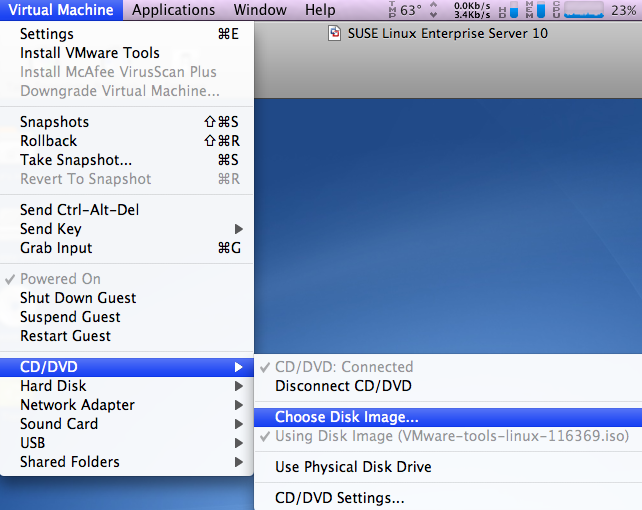
Click on Virtual Machine > CD/DVD > choose disk image
and select the iso file
also, make sure that CD/DVD is Connected


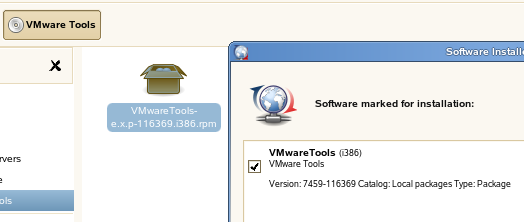
You should now have the following icon on your SLES desktop


double click on VMware Tools
and run the RPM installer


Configure VMware Tools:
Load up a terminal windows in SLES

vmware-config-tools.pl

Respond to the questions the installer displays on the screen. Press Enter to accept the default value.


Restart the VM machine

Thats IT!
vmware tools should now be installed and working!


from vmware.com

Wednesday, November 19, 2008

Monday, November 17, 2008

Upgrading OTRS 2.2.8 to 2.3.3 on SLES 10

Download the rpm package from otrs.org


The instructions on upgrading can be found in opt/otrs

Stop all services
"rcotrs stop-force"
Backup everything - the otrs direcotry (opt/otrs and the mysql DB.

run the rpm

run the mysql upgrade scripts (I used the mysql query administrator to do this)
otrs/scripts/DBUpdate-to-2.3.mysql
i ran into errors when doing this and had to manually step through each line of the sql script.


Run the migration script (you need ot run as the OTRS user, not as root)
$OTRS_HOME/scripts/DBUpdate-to-2.3.pl

however i ran as root and when finsihed run
otrs/bin/SetPermissions.sh

run the 2nd mysql update script
$OTRS_HOME/scripts/DBUpdate-to-2.3.post.mysql.sql

Restart the OTRS services
rcotrs restart-force

OTRS on SLES 10SP2 32bit

Migrating OTRS 2.28 to a new server
then upgrading to OTRS 2.3

To install OTRS in SLES 10sp2 you need to instal some extra perl-gd packages.
The packages can be installed form the SLES10SDK-x86 SP2 DVDs
I managed to find an online repository using google search.

Once you have the packages you must manually install all the "Perl-gd-*" packages
for some reason they wont install automatically (well they wouldnt for me when i attempted to install otrs from the rpm file)

Anyways, once all the perl-gd packages are installed you can then install otrs.
double click on the rpm and away you go.
You will be prompted to install some extra packages, this will be done automatically.

Friday, November 14, 2008

SLES 10 sp2 32bit on XenServer

Install the Guest Agent
once installed, mount the xs-tools iso to install the guest agent

mount /dev/xvdd /mnt

Execute the installation script as the root user
/mnt/Linux/install.sh

Reboot the VM

Monday, February 11, 2008

Cron Job - cron tabs

the otrs cron file disappeared from
/var/spool/cron/tabs
so i had to add the file back in there.
I wonder if i have this setup wrong or was it just a once off thing?
anyways i will monitor it and if it happens again i will reconfigure the cron.

Monday, February 04, 2008

SLES 10 sp1 OTRS - Cron Jobs

after setting up a new OTRS installation (www.otrs.org)
I had to setup a cron job to pop emails from our server to check for new tickets.
This website helped - http://en.opensuse.org/SUSE_Package_Conventions/Cron_Jobs

Cron Job to setup was listed on the otrs website
i added in

# --
# cron/postmaster_pop3 - postmaster_pop3 cron of the OTRS
# Copyright (C) 2002-2003 Martin Edenhofer
# --
# $Id: installation-and-basic-configuration.xml,v 1.10 2006/09/07 13:15:07 cs Exp $
# --
# This software comes with ABSOLUTELY NO WARRANTY.
# --
# fetch emails every 10 minutes
*/10 * * * * $HOME/bin/PostMasterPOP3.pl >> /dev/null
# --
to the file
/var/spool/cron/tabs/otrs